
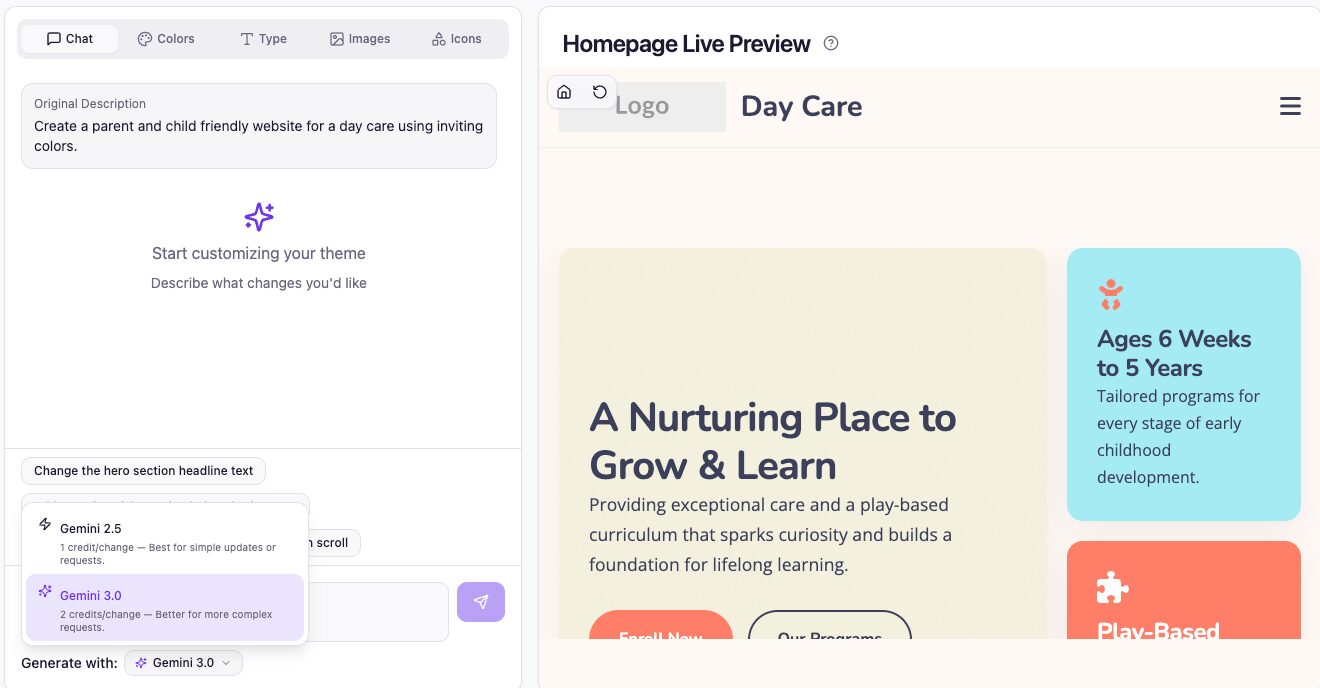
We’ve just rolled out one of the most impactful upgrades to PressMeGPT yet:
- Gemini 3.0 is now available as a selectable model
- You can now toggle between Gemini 2.5 and 3.0 to optimize performance and credit usage
This gives you more control than ever—use cutting-edge AI when you need it, and save credits when you don’t.
Gemini 3.0 Is Here (And It’s a Big Leap)
Gemini 3.0 represents a meaningful jump forward in how AI understands, generates, and structures code – especially for web development workflows.
Key Improvements Over Gemini 2.5 (Even 2.5 Pro)
1. Better Code Accuracy & Structure
- More consistent HTML/CSS output with fewer structural errors
- Improved handling of nested layouts, spacing systems, and responsive behavior
- Cleaner, more production-ready WordPress theme code
2. Stronger Design Interpretation
- Better at translating visual layouts into usable components
- More accurate spacing, alignment, and hierarchy
- Improved “design taste” – Outputs feel more polished and modern
3. Superior Large Context Handling
- Handles complex inputs (like full HTML pages or multi-section designs) more reliably
- Less likely to “lose track” of elements in long prompts
- Better continuity across multi-step edits
4. Smarter Component Reuse
- Identifies repeating patterns (headers, cards, sections) and structures them more efficiently
- Produces more reusable layouts – especially helpful for future multi-page workflows
5. Improved Conversion Quality
- Higher fidelity when converting from:
- Better handling of edge cases like inline styles, scripts, and media
Use the Right Model for the Job
With this release, you’re no longer locked into a single model.
You’ll now see a model selector dropdown inside PressMeGPT where you can choose between:
- Gemini 2.5 (Fast & Cost-Efficient)
- Gemini 3.0 (More Powerful, Higher Fidelity)
When to Use Gemini 3.0
Use 3.0 when precision matters most:
- Complex HTML → WordPress conversions
- Replicating detailed designs from other platforms
- Large or messy codebases
- When you want the best possible output on website design with minimal cleanup
When to Use Gemini 2.5
Stick with 2.5 for faster, cheaper iterations once a WordPress theme has been generated.
- Simple prompt-based edits (“change colors”, “add a section”)
- Minor layout tweaks
- Iterating quickly on ideas before finalizing
Smarter Credit Usage
Before this update, every request used the same model—whether it needed that power or not.
Now:
- You can reserve 3.0 for high-value tasks – HTML to WordPress conversions, for example.
- Use 2.5 for everyday edits – “Change the call-to-action button color to purple”, etc.
- Stretch your credits further without sacrificing quality
This is especially useful if you’re:
- Building multiple themes
- Iterating quickly with AI prompts
- Testing different design directions
Why This Matters
PressMeGPT is evolving from a “generate once” tool into a true AI-powered WordPress website builder.
Giving you control over the model means:
- Faster workflows
- Better outputs when it counts
- More efficient use of credits
And with upcoming features like multi-page generation and deeper editing capabilities, this flexibility becomes even more valuable.
How to Use It
- Open your project in PressMeGPT
- Look for the model dropdown selector
- Choose:
- Gemini 2.5 for speed and efficiency
- Gemini 3.0 for power and precision
- Run your prompt or generation as usual
That’s it.
Final Thoughts
This release is all about control and quality.
You now have:
- A more powerful AI (Gemini 3.0)
- The flexibility to choose when to use it
- A smarter way to manage credits
If you’ve been pushing the limits of what PressMeGPT can do—this upgrade is going to feel like a cheat code.
Try Gemini 3.0 today and see the difference in your web designs.