

One of the hardest parts of building a website is starting with a blank page.
You may know the type of site you want to create, but explaining the layout, colors, spacing, typography, and overall feel from scratch can still take hours. That’s why we added one of the most requested features to PressMeGPT: the ability to use another website as inspiration when generating a WordPress theme with AI.
Instead of manually recreating layouts or hiring a designer to mock up concepts, you can now simply describe the website you want and paste in a URL of a site you like. PressMeGPT analyzes the inspiration site and uses AI to generate a completely new native WordPress theme inspired by the structure and design patterns of that website.
The result is a dramatically faster workflow for freelancers, agencies, business owners, and creators who want a custom WordPress site without starting from zero.
Watch the Full Demo
In the full video demo, you’ll see:
- How to generate a WordPress theme from a prompt
- How to use another website as inspiration
- How to customize the design with AI
- How to create additional pages
- How to preview the final result in a live WordPress environment
How It Works
The process is simple.
First, describe the type of website you want to create. This can be something broad like:
“Create a modern HVAC company website”
Or something more specific like:
“Create a luxury law firm website with dark colors and strong typography.”
Then paste in the URL of a website you like. Make sure the “Inspiration” box is selected, not the “Copy” so AI will use the markup to create a similar one but not copy it exactly.
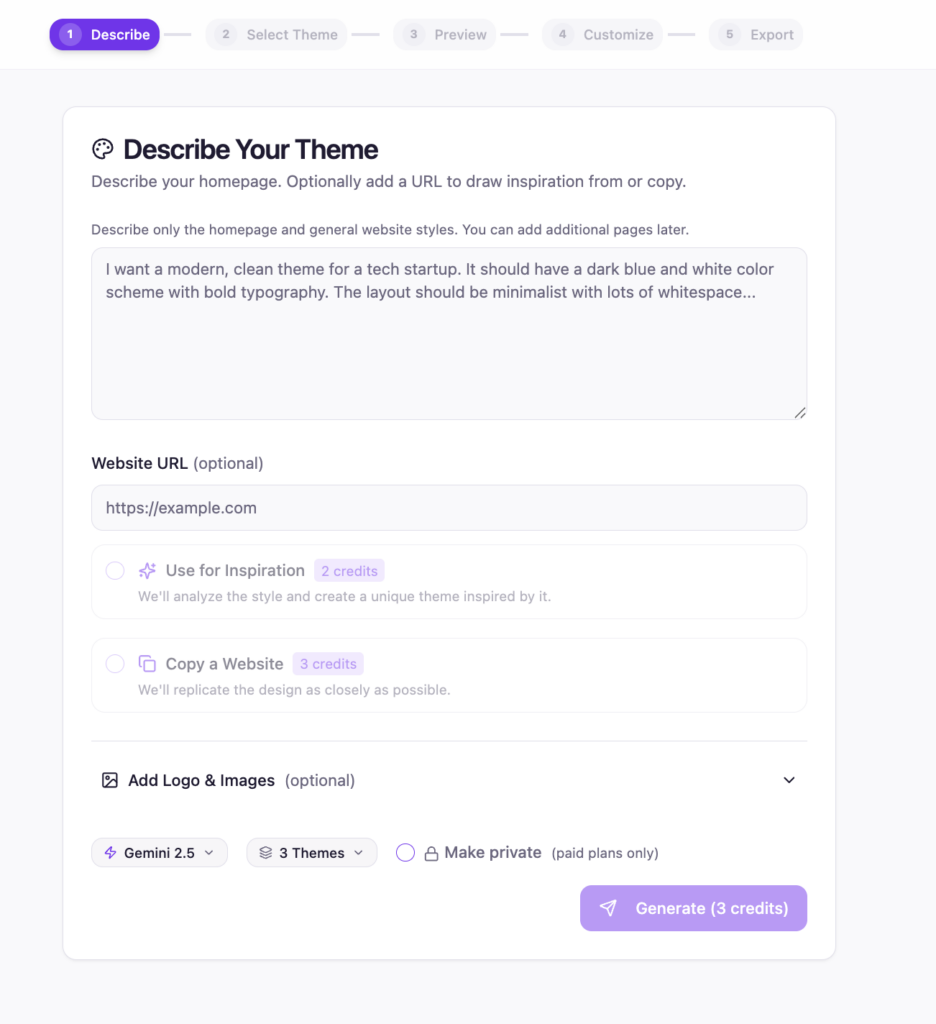
The AI uses the site as inspiration for layout ideas, spacing, styling, visual hierarchy, and overall design direction while still generating a unique WordPress theme tailored to your prompt.
This is especially useful when:
- You like the structure of another website
- A client sends examples of sites they love
- You want to quickly prototype ideas
- You need inspiration without copying designs manually
- You want to convert modern web styles into native WordPress themes
Making Changes with AI Prompts
Once the initial theme is generated, you can continue customizing it using simple prompts.
In the demo video, we show examples like:
- Changing the color scheme
- Creating a brand new page
- Replacing an image
- Refining sections of the design
Instead of digging through theme files or page builder settings, you simply tell the AI what you want changed.
For example:
- “Change the site to a blue and white color palette”
- “Add an About Us page”
- “Replace the hero image with something more modern”
PressMeGPT then updates the theme automatically.
This makes iteration dramatically faster than traditional WordPress workflows.
Preview the Theme Instantly in WordPress
One of the biggest frustrations with AI website builders is wondering whether the exported website will actually work correctly once installed.
That’s why PressMeGPT includes Preview in WordPress.
With one click, the platform spins up a temporary WordPress instance and installs the generated theme automatically. You can preview the site in a real WordPress environment before exporting it.
The preview environment includes:
- A temporary WordPress install
- One-click access to WP Admin
- Single sign-on access
- Support for both Classic and Gutenberg themes
- A live environment for testing changes
This gives you the “aha” moment immediately because you can see the generated design working inside WordPress instead of just viewing screenshots.
Native WordPress Themes Without the Bloat
Unlike many AI website builders that rely heavily on proprietary systems or locked-down exports, PressMeGPT generates native WordPress themes.
That means:
- No required subscriptions after export
- No forced hosting platform
- No page builder lock-in
- Host your site anywhere
- Own your exported theme completely
You can continue editing your site directly in WordPress using Gutenberg or your preferred workflow.
Better than your old workflow
Using another website as inspiration dramatically speeds up the website creation process.
Instead of spending hours gathering references, building mockups, configuring page builders, and recreating layouts manually, you can now:
- Describe the site you want
- Paste a URL for inspiration
- Generate a custom WordPress theme
- Refine it with AI prompts
- Preview it instantly in WordPress
The entire process can take minutes instead of days.
Try PressMeGPT for free.