
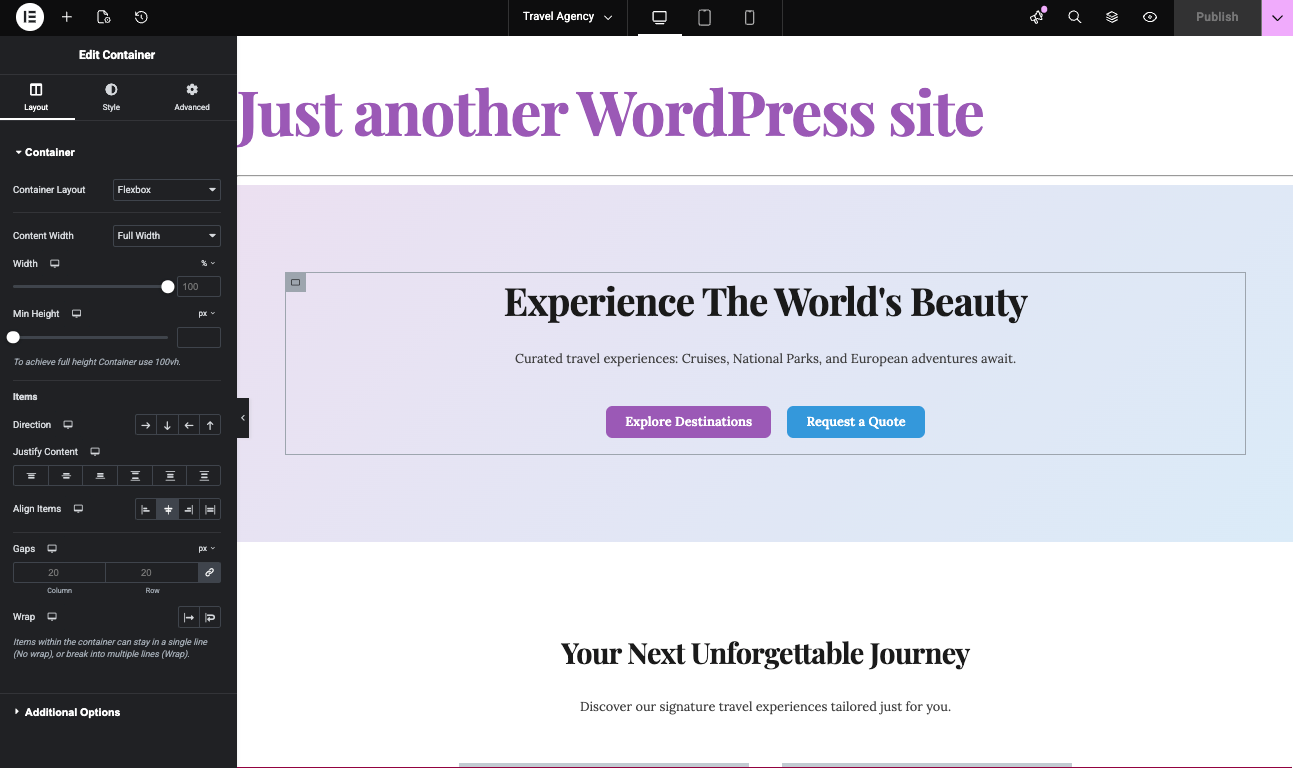
If you’re exploring ways to build and customize WordPress sites, Elementor is probably already on your radar. Elementor One offers a unified experience for site design and management, but its features and pricing can motivate users to look for new alternatives. This guide and video above focuses on how artificial intelligence can revolutionize Elementor template creation—delivering speed, flexibility, and cost savings.
AI-powered tools, like PressMeGPT, enable users to create Elementor templates in minutes—often without advanced design skills or expensive subscriptions. We’ll dive into the practical steps, explain the competitive advantages over default methods, and showcase how AI opens up new creative possibilities for builders who want more control and value.
Understanding Elementor One and Its Limitations
Elementor One is a premium all-in-one solution designed to streamline website creation on WordPress. It bundles multiple tools under one plan, including the Elementor Pro builder, hosting, cloud storage, and extra features (like the upcoming AI builder) aimed at delivering a seamless workflow. This setup is particularly appealing to professional web designers who want an integrated platform with fewer moving parts to manage.
Key features of Elementor One include a vast template library, powerful visual design tools, cloud-based hosting, and built-in collaboration options. These features are meant to enhance productivity, especially for teams and agencies that manage several sites or require a comprehensive package for clients.
Despite its appeal, Elementor One does have notable limitations.
For starters, it comes with a higher price, typically charged per site per month or per year, which can add up quickly for freelancers or small business owners. Many users also find the available templates somewhat limiting in terms of deep customization and scalability. Advanced modifications often require additional plugins or coding knowledge.
Other concerns include being tied to Elementor’s ecosystem, making switching builders or exporting sites more complex. For users who value flexibility, or who work with multiple page builders and want to avoid vendor lock-in, these limitations spark the search for AI-driven or alternative solutions that deliver more freedom and value.
AI-Powered Website Building for WordPress
AI-powered website builders are transforming how people create and manage WordPress sites. With artificial intelligence, complex tasks like layout design, content generation, and image selection can now be automated or assisted in real time. This shift is making high-quality web development accessible to a wider range of users.
Modern AI tools for WordPress leverage machine learning and large language models to generate unique templates, provide copywriting suggestions, select optimized visuals, and even adjust design elements based on user intent or branding guidelines. This means creators can skip repetitive work, letting AI handle the heavy lifting of design structure and content drafts.
Integration is another huge advantage: many of these AI solutions work directly inside the WordPress dashboard or as add-ons to page builders like Elementor and Gutenberg. Tools like PressMeGPT, for example, offer compatibility with both free and paid versions of Elementor, enabling users to access AI features without being confined to expensive, one-size-fits-all plans.
The rise of AI in web design signals a broader industry trend—streamlining workflows while improving results, whether you’re a seasoned developer or someone building their first site. As AI gets smarter and more user-friendly, options for personalized, efficient WordPress website creation will only continue to expand.
How AI Enhances Elementor Template Creation
AI technologies bring game-changing enhancements to the process of designing templates in Elementor. By analyzing user preferences, project requirements, and web design best practices, AI-driven tools can generate entire layouts or specific design blocks (or templates for Elementor) automatically. This dramatically reduces the time needed to get started with a professional-looking site.
For example, with the right AI tool, users can input a few prompts such as site goals, color schemes, or target audience, and receive customized template suggestions at the click of a button. The AI can assemble headers, footers, content sections, and even provide ready-to-use copy and media, all tailored to fit the project’s branding.
As a professional web designer with tools like Elementor or Divi, this process can take hours with drag-and-drop.
These smart features lower the creative barrier, especially for non-developers or those tired of repetitive design routines. Developers, meanwhile, gain the ability to prototype and iterate faster, then fine-tune the AI’s output for advanced customization. Common AI-powered features include layout auto-generation, smart content blocks, instant image recommendations, and dynamic element adaptation based on industry trends.
Overall, AI-enhanced Elementor template creation empowers users to produce unique, effective web designs—without needing to start from scratch or invest considerable time learning the finer points of front-end development.
Starter Templates and AI-Powered Options
Starter templates are a cornerstone of modern web design, offering pre-built layouts that speed up site creation. Traditionally, Elementor users rely on built-in template libraries, which supply static designs for various page types—landing pages, portfolios, contact pages, and more. While convenient, these libraries often lack deep customization and real-time adaptation to individual needs.
AI-powered starter templates take things a step further. Instead of serving fixed options, these tools generate templates based on user input or business requirements. For example, you could tell an AI what your business does, choose your design preferences, and instantly receive tailored layout options complete with sample content and images.
The difference comes down to flexibility and personalization. AI-generated templates adapt to changing project needs, branding, and audience focus. This significantly improves ease of use: instead of trying to retrofit a generic layout, users start much closer to their desired final result. PressMeGPT exemplifies this approach with rapid, customized template generation for both Elementor and Gutenberg builders.
By leveraging AI, designers can launch sites more quickly and with less manual tweaking—ultimately streamlining the journey from concept to published website and keeping creative options wide open for all types of users.
Key Benefits of Creating Elementor Templates With AI
- Speed: AI tools drastically cut down the time it takes to create, adjust, and deploy templates. Users can go from idea to live design in a fraction of the time compared to traditional methods.
- Flexibility: Unlike fixed template libraries, AI-generated templates created with PressMeGPT can be exported to Elementor, Gutenberg, or Classic so you aren’t locked into one WordPress builder ecosystem.
- Improved UX/UI: AI draws from modern design principles and user data to suggest layouts and elements that boost usability, visual appeal, and conversions, even for non-designers.
- Cost Savings: By reducing reliance on premium subscriptions or hiring outside designers, AI-powered solutions can significantly lower web development costs—especially for small businesses and freelancers.
- Consistent Results: AI streamlines design processes, ensuring similar quality and coherence across multiple pages or projects, which is especially useful for agencies and teams.
Step-by-Step Guide to Creating Elementor Templates With AI
Building Elementor templates with AI introduces a faster, smarter workflow for anyone looking to enhance their site’s design or efficiency. This section sets you up for success by outlining each critical step, from selecting an AI tool to customizing your templates and managing your library for future projects.
Whether you’re a first-timer or a veteran Elementor user, the process is designed to fit all experience levels. By letting AI handle the base structure and initial content, you can focus your energy on creative adjustments and business needs rather than starting from a blank slate.
Choosing the Right AI Tools
- PressMeGPT: Works with both free and paid Elementor, as well as Gutenberg which is great for users wanting flexibility and avoiding builder lock-in. You can host wherever you’d like.
- 10Web AI Builder: Focuses on automated site creation and layout generation, with good integration for Elementor users but you are locked into 10Web’s hosting plans.
- GetGenie: Offers AI-powered copywriting and template suggestion features within WordPress.
- Bertha AI: Delivers content and image generation right inside WordPress and Elementor editors for quick template filling.
When choosing, compare integration, user interface, features, and cost. Prioritize tools that seamlessly fit your workflow and budget.
Setting Up Your WordPress Site for AI Integration
- Install WordPress: Set up a fresh WordPress installation or ensure your existing site is up to date to avoid compatibility issues.
- Install Elementor: Add the free or Pro version of Elementor from the Plugins menu.
- Visit PressMeGPT.com and generate your first Elementor template for free.
- Upload the template in the Edit menu in Elementor
- Apply the template to a page.
Generating Template Structures Automatically With AI
AI-powered tools can instantly generate template structures for Elementor, building headers, footers, content sections, and sidebars based on your chosen style or project brief.
One benefit of PressMeGPT over some other AI builders for WordPress like ZipWP is that it not only allows you to create the initial design with AI, it also allows you to modify the design with prompts. This is fantastic because as you know, AI can and does make mistakes.
Customizing Template Content and Style
- Edit Text: Quickly update headings, paragraphs, and call-to-actions generated by AI to better fit your brand voice.
- Add Images: Swap placeholder visuals with your own images or use AI-generated graphics relevant to your business.
- Adjust Color and Typography: Tweak global color palettes, fonts, and line spacing for full alignment with your branding guidelines.
- Refine Layout: Move, resize, or delete sections using Elementor’s visual editor, allowing both simple tweaks and advanced design changes.
- Leverage Advanced AI Features: Use AI content blocks or dynamic sections to add context-aware recommendations, making your templates stand out.
Saving and Reusing AI-Created Elementor Templates
Elementor allows you to save custom templates directly from the editor. Once your AI-created template is ready, simply visit the Export screen and select Elementor from the options.
You can now edit that template right from Elementor within WordPress, or you can return to PressMeGPT and remix the Elementor template for a different website in the future.
Elementor Alternatives With AI Capabilities
Elementor may be a leading page builder, but it’s not the only one embracing AI for WordPress site design. As demand for intelligent automation grows, a number of competing builders have begun integrating AI-powered template creation, automation, and content assistance features. This includes Elementor, Divi, and even Automattic (the company behind WordPress).
Some prioritize seamless templates, while others focus on flexible workflows or broader integration beyond Elementor’s ecosystem. It’s now possible to find page builders that automatically generate page structures, write web copy, or suggest optimal design patterns based on user goals or industry trends.
But up until now, all only allow you to generate for their ecosystem, not any website builder. For example, WordPress’s Telex tool only generates Gutenberg blocks, Elementor’s tool only generates Elementor compatible templates, Divi only generates Divi, etc.
With PressMeGPT you can create WP themes for any popular framework or builder. In fact, you can read about several Elementor and Gutenberg plugins that it is compatible with.
Success Stories Using AI for Elementor Templates
Many users across industries have seen measurable benefits by switching to AI-powered template creation for Elementor. For example, a design agency in Florida running PressMeGPT cut their average development time from a full workday per site to under two hours per client. This allowed them to take on more projects and deliver faster turnarounds without sacrificing quality.
Small businesses and solopreneurs, especially those on tight budgets, have reported launching WordPress sites using the free version of Elementor combined with AI for layout and content – completely bypassing the need for premium templates or expensive development help. This includes a botique hotel in Europe and an RV Park in Texas.
User testimonials highlight increased satisfaction with design flexibility. In one survey, 76% of respondents said that PressMeGPT was “fastest and easiest” way to create WP sites. Case studies from SaaS companies to local restaurants confirm that AI-generated templates both improved their online image and freed up time for other business tasks.
Future Trends in AI-Powered Web Design
The next wave of AI in WordPress and Elementor web design will bring even greater automation, intelligence, and personalization. Analysts forecast a sharp rise in “context-aware” design—where AI suggests layouts and content not just based on trends but also on real-time analytics from your audience’s behavior.
Industry leaders like PressMeGPT are already pioneering tools that bridge builders such as Elementor and Gutenberg, allowing seamless AI-powered workflows. As WordPress itself embraces native AI support, expect even more integration, smarter design suggestions, and streamlined deployment—making great web design accessible to all skill levels.
Staying ahead means monitoring these trends, experimenting with early-release features, and choosing platforms that keep expanding their AI capabilities.
Is AI the Right Elementor One Alternative for You?
AI-powered template creation is a great alternative if you want lower costs, faster turnaround, or more design freedom than Elementor One typically offers. It’s particularly appealing to freelancers, small business owners, and agencies looking to avoid high per-site fees or rigid template options.
If you often need deeply customizable layouts or switch between multiple page builders, solutions like PressMeGPT deliver unmatched flexibility by working with both Elementor and Gutenberg. This removes the risk of builder lock-in and helps future-proof your workflow.
Ultimately, the best fit depends on your budget, project scope, and desired creative control. If you want versatility and savings without sacrificing quality, AI alternatives deserve serious consideration.
Frequently Asked Questions on AI and Elementor Templates
- Does AI-powered template creation work with free Elementor? Yes, platforms like PressMeGPT provide full AI template features with both free and pro Elementor, saving on licensing costs.
- Can AI-generated templates be fully customized? Absolutely. Once generated, you can edit layouts, images, colors, and text with Elementor’s visual editor and the AI plugin’s options.
- Is there a steep learning curve for using AI plugins? Most popular tools are designed for beginners, offering guided prompts and tutorials. Users report getting up to speed within an hour.
- What about support if something goes wrong? Leading plugins offer documentation, direct support channels, and active user communities for troubleshooting and advice.
- Are there any hidden costs with AI integration? Most AI plugins are transparent about pricing, with clear upgrade paths. Be sure to review pricing based on site volume and needed features to avoid surprises.
Final Thoughts on AI and Elementor Template Creation
AI is redefining how Elementor templates are created, unlocking new levels of speed, affordability, and creative freedom for WordPress users. With options like PressMeGPT that work across builders—without requiring expensive per-live-site subscriptions—there’s never been a better time to explore AI-driven web design.
Whether you’re launching a single site or managing dozens for clients, the workflow improvements and customization options now available can save hours, reduce costs, and enable more engaging, brand-focused results. Consider trying the AI-enhanced approach for your next project—you may be surprised just how much easier and enjoyable website creation can be.