
AI has made building a website faster than ever. What once took weeks of back-and-forth with designers and developers can now happen in minutes. You enter a few details about your business, and an AI tool generates layouts, copy, and structure automatically.
But speed alone isn’t a strategy.
The real question isn’t can AI build your website — it’s whether the website it builds will actually work for your business. A site that looks polished on day one but can’t be updated, doesn’t rank on Google, or falls apart the moment you need to add a new page is not a good outcome, no matter how fast it was generated.
Before you commit to any AI website builder, these seven questions will help you think it through.
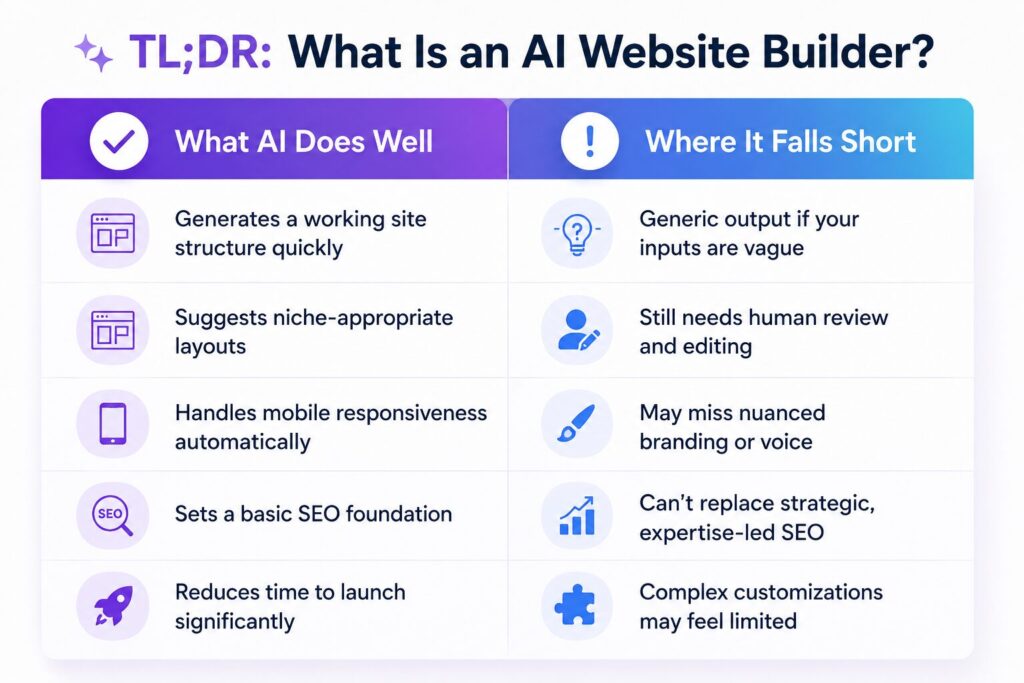
TL;DR: What Is an AI Website Builder?
An AI website builder uses machine learning to generate website layouts, content, and design structures based on inputs like your business name, industry, and goals. Some tools even pull in data from your Google Business Profile or social accounts to personalize the output.
Popular examples include PressMeGPT, Wix ADI, Hostinger AI Builder, and CodeDesign — each with its own approach to balancing automation and control.
Project Questions
Start here — before you compare tools or pricing plans. These questions are about your project, not any platform.
Question 1: What Kind of Website Do You Actually Need?
This seems obvious, but many people skip it and end up with a tool that doesn’t match their actual requirements.
Are you building:
- – A personal portfolio to showcase your work?
- – A service-based website for a local or online business?
- – A blog designed to grow through organic search?
- – A landing page for a product or campaign?
- – An eCommerce store?
- – A multi-page site with forms, bookings, or a CMS?
Why it matters: AI builders interpret your inputs and generate a structure based on them. If the builder is optimized for simple landing pages but you need a 15-page service website with a blog and contact forms, that mismatch will cost you time later.
Be honest about what you’re building before choosing where to build it.
Question 2: Do You Need Speed, Full Control, or Both?
AI builders sit on a spectrum. On one end, you get maximum automation — the AI makes most decisions for you, and you get a finished site in minutes. On the other end, you get full control — the AI is more of a starting point, and you customize everything afterward.
Neither extreme is better by default. The right choice depends on your project.
If speed is your priority: Single-page sites, event pages, quick business launches, and MVP landing pages are often well-served by fast, fully automated AI generation. Getting online quickly is the goal, and a clean, functional site achieves it.
If control matters: If you have a defined brand identity, specific content needs, or plans to grow the site over time, look for a builder that lets you override AI decisions — not just swap colors, but adjust layouts, rewrite copy, restructure sections, and add functionality as you go.
The best scenario is a builder that’s fast to start and flexible afterward. That combination is rarer than it should be, so it’s worth specifically checking for.
Question 3: Will the Site Actually Reflect Your Brand?
AI-generated websites tend to look clean and professional. They also tend to look a lot like each other.
If your business relies on standing out — and most do — a generic-looking site can actively work against you. Visitors form an impression in seconds. A site that looks like a template signals a business that hasn’t invested in its identity.
Before choosing a builder, check whether it lets you:
- Apply a consistent visual identity across all pages (logo, colors, typography)
- Edit copy to match your actual tone and voice — not just swap AI-generated filler text
- Customize structural elements like headers, footers, buttons, and section layouts
- Replace stock visuals with your own images and branded assets
The goal isn’t pixel-perfect design. It’s a site that feels like you — not a placeholder waiting to be filled in.
Platform Questions
Once you’re clear on your project needs, start evaluating the platforms themselves.
Question 4: How Will the Site Perform in Search?
A website that nobody can find is a significant problem, regardless of how good it looks.
AI builders vary significantly in their approach to SEO. Most handle the basics — meta tags, clean URLs, mobile responsiveness. That’s enough to get indexed. But if you want to rank for competitive terms or build organic traffic over time, basics aren’t enough.
Look for a builder that supports:
- Content control — the ability to write, edit, and expand your own content beyond what the AI generates
- On-page SEO editing — custom titles, meta descriptions, header hierarchy, and image alt text
- Technical SEO foundations — fast-loading pages, valid schema markup, XML sitemaps, robots.txt access
- Structured content management — an easy way to add new pages, posts, or landing pages over time
One thing worth noting: Google doesn’t penalize AI-generated content as a rule, but it does reward original, expert-level content. If your builder only produces generic copy and doesn’t give you room to improve it, you’ll plateau quickly in search.
Question 5: Will It Work With the Tools You Already Use?
Your website doesn’t operate in isolation.
Most businesses run a collection of tools alongside their site — email marketing platforms, CRMs, booking systems, analytics, payment gateways, social channels. If your AI website builder doesn’t connect to these, you’re creating fragmentation that becomes harder to manage as your business grows.
Before committing to a platform, check:
- Does it support integrations with your existing tools?
- Are those integrations native, or do they require third-party workarounds?
- Is the documentation clear, and is there support if something breaks?
A website that runs well as part of your wider workflow is more valuable than one that requires constant manual bridging between platforms.
Question 6: How Easy Is It to Update Later?
Launching your website is not the finish line. It’s the starting point.
Your site needs to evolve alongside your business. Products change. Services expand. Blog content needs publishing. Pages need refreshing. Integrations need adding. Security needs maintaining.
Many AI builders make the launch easy and the maintenance difficult. That’s a trade-off worth understanding before you sign up.
A good platform should let you:
- Update written content, images, and media without touching code
- Add or restructure pages without breaking existing layouts
- Adjust SEO elements as your strategy develops
- Add new features and integrations as your business grows
- Manage everything through a CMS that doesn’t require a developer
Also worth considering: AI-generated code can sometimes introduce security vulnerabilities that aren’t immediately visible. Before and after major updates, it’s worth running through a basic security checklist, particularly if your site handles customer data or transactions.
Question 7: What Is the Real Long-Term Cost?
The headline price is rarely the full picture.
Most AI website builders offer a free plan or a low-cost entry tier. These are usually fine for testing, but they come with meaningful limitations — a cap on AI generations, restricted features, storage limits, subdomain branding, or no access to advanced customization.
When you’re comparing platforms, don’t just look at the monthly price. Look at:
- What’s actually included at each pricing tier
- What you’ll need to upgrade for — eCommerce, analytics, custom domain, additional pages
- Hidden costs that appear over time — integrations, templates, storage, traffic overage
- Migration risk — if you outgrow the platform, how difficult is it to move?
The cheapest option upfront is often not the cheapest option over two or three years. A platform that grows with you is worth paying a little more for, especially compared to the cost of rebuilding from scratch.
Why PressMeGPT Stands Out
We’re biased, but we built PressMeGPT specifically to address the kinds of problems this article describes.
Here’s what that looks like in practice:
- AI-powered WordPress theme generation — generate complete, customized WordPress websites without starting from a blank theme or fighting a page builder
- Full design control after generation — layouts, typography, color systems, sections, and content are all editable after the AI does its work
- WordPress-native workflow — because PressMeGPT outputs real WordPress themes, you keep access to the entire WordPress plugin ecosystem and nothing is locked inside a proprietary platform
- Brand-focused customization — generated output is a starting point, not a final product; every element can be refined to match your identity
- Scalable from day one — the architecture supports growth, so you’re not rebuilding when your business expands
- SEO-ready foundations — clean code, proper structure, and full control over on-page SEO from the start
In short, the questions in this article — about control, branding, SEO, integrations, maintenance, and cost — are the same questions that shaped how PressMeGPT was built.
Final Thoughts: Choosing the Right AI Website Builder
AI website builders are genuinely useful. They’ve lowered the barrier to getting online significantly, and that’s a good thing for businesses that previously couldn’t afford professional web development.
But the category is noisy, and not every tool delivers what it promises. The ones that do tend to share a few characteristics: they’re fast without being rigid, they give you real control over the output, and they’re built to last beyond the launch day.
Before making a decision, run through these questions:
- What type of website am I actually building?
- Do I need speed, full control, or both?
- Will the AI output reflect my brand identity?
- How will the site perform in search?
- Does it work with my existing tools?
- How easy will it be to update over time?
- What will it really cost me long-term?
Getting clear answers on each of these will narrow your options quickly and help you avoid the most common mistake in this space — choosing the fastest tool rather than the right one.
If you’re building on WordPress and want AI that gives you a real head start without sacrificing flexibility, PressMeGPT is worth a look.
Frequently Asked Questions
How do I know if an AI website builder is right for me? If you need to launch a professional website quickly and don’t have extensive development experience, an AI builder can significantly reduce the time and cost involved. The key is choosing one that gives you control after generation, not just a fast start.
Can I switch platforms after using an AI builder? Yes, but migration can be painful depending on how the platform stores your content. Platforms that output standard code or work within established ecosystems (like WordPress) are generally much easier to migrate from than proprietary closed platforms.
Are AI-generated websites SEO-friendly? They can be, if the platform supports on-page editing, clean technical structure, and content management. AI can set the foundation, but ongoing SEO requires human input, original content, and regular updates.
What’s the difference between AI builders and WordPress? WordPress is a content management system that powers around 44% of all websites. It requires a theme and, usually, a page builder to design with. AI builders like PressMeGPT can generate WordPress-ready themes automatically, combining the flexibility of WordPress with the speed of AI generation.