
# GenerateBlocks + PressMeGPT: Maximum Design Control with Minimum Code Bloat
Rating: 4.9/5 stars | 300,000+ Active Installations | The Developer’s Choice for Clean Code
Modern WordPress development often forces site owners to choose between two extremes: complete design freedom or strong performance. Many visual builders make it easy to create impressive layouts, but they can also introduce large CSS files, extra scripts, and complicated markup structures that gradually slow websites down.
That tradeoff is one reason why more developers are shifting toward lightweight Gutenberg-based workflows.
GenerateBlocks has become one of the most popular tools in that space because it focuses on flexibility without relying on heavy frontend frameworks. Instead of adding hundreds of widgets and animations, it provides a smaller set of foundational blocks that can be combined to create highly customized layouts while keeping output relatively clean.
When paired with PressMeGPT, the workflow becomes even more efficient. PressMeGPT helps generate a lightweight WordPress theme structure using AI, while GenerateBlocks gives developers precise layout and styling control directly inside Gutenberg.
The result is a modern WordPress workflow that feels flexible without becoming unnecessarily bloated.
Why Many WordPress Sites Become Bloated Over Time
A common issue in WordPress projects is that complexity builds gradually.
A website may start with a simple theme and a few plugins, but over time additional tools are added for layouts, sliders, animations, responsive controls, optimization, popups, forms, and styling adjustments. Eventually the site depends on multiple layers of plugins just to maintain performance and consistency.
In many cases, optimization plugins are later installed to compensate for performance problems introduced by the original stack itself.
That usually leads to:
- – slower loading pages,
- – inconsistent frontend behavior,
- – larger CSS and JavaScript files,
- – more maintenance overhead,
- – and higher hosting demands.
For agencies and freelancers managing multiple websites, that complexity can become difficult to scale.
What Makes GenerateBlocks Different
GenerateBlocks approaches page building differently from many traditional builders.
Rather than focusing on dozens of specialized widgets, it concentrates on a smaller group of flexible blocks like:
- – Containers
- – Grids
- – Headlines
- – Buttons
- – Images
Those building blocks can then be combined to create highly customized layouts without depending heavily on prebuilt templates or deeply nested structures.
That approach gives developers more control over spacing, responsiveness, alignment, and typography while still working inside the native Gutenberg editor.
The plugin feels less like a traditional drag-and-drop system and more like a lightweight design framework built for Gutenberg.
More Design Control Without Heavy Templates
One of the biggest strengths of GenerateBlocks is the balance it creates between visual editing and layout precision.
The container and grid system makes it possible to create:
- – custom hero sections,
- – feature grids,
- – landing pages,
- – responsive content layouts,
- – pricing sections,
- – advanced page structures
without needing complicated page-builder ecosystems.
Instead of relying entirely on rigid templates, developers can build layouts more intentionally and maintain cleaner structural control over the site.
That flexibility becomes especially useful when combined with PressMeGPT-generated themes.
Rather than starting from a bulky multipurpose theme, developers can begin with a cleaner AI-generated foundation and then refine the design visually using GenerateBlocks.
How PressMeGPT Fits Into the Workflow
PressMeGPT focuses on generating WordPress themes and site structures using AI. Instead of relying on large starter themes filled with unnecessary features, it helps developers begin with a more streamlined base.
A practical workflow often looks like this:
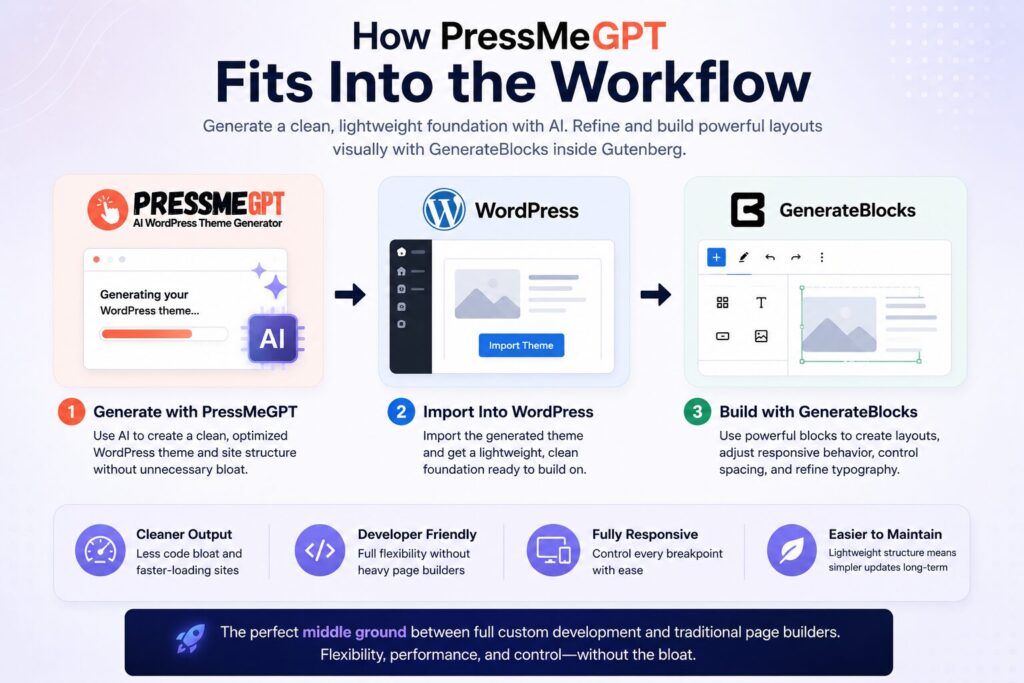
First, the site structure or theme foundation is generated with PressMeGPT. Once imported into WordPress, GenerateBlocks can then be used to build layouts, adjust responsive behavior, control spacing, and refine typography directly inside Gutenberg.
Because both tools lean toward cleaner frontend output, the overall workflow remains lighter and easier to maintain compared to many traditional page-builder setups.
For developers who want flexibility without fully custom-coding every section manually, this creates a useful middle ground.
Global Styles and Design Consistency
Another area where GenerateBlocks becomes especially useful is global styling.
Maintaining consistency across large WordPress websites can become difficult when colors, typography, spacing, and button styles are manually adjusted page by page.
GenerateBlocks helps simplify that process by allowing reusable styling systems across layouts. Instead of redesigning every section individually, developers can maintain more consistent spacing, typography scales, and visual hierarchy throughout the site.
For agencies working across multiple client projects, this can significantly reduce repetitive design adjustments while making future updates easier.
Advanced Grid and Responsive Layout Controls
Responsive design is another reason many developers prefer GenerateBlocks.
The grid system provides more direct control over layout structure across desktop, tablet, and mobile views without needing large responsive frameworks.
Developers can create:
- – multi-column content sections,
- – asymmetrical layouts,
- – feature grids,
- – sidebar structures,
- – responsive landing pages
while still keeping the editing experience relatively clean.
This becomes especially valuable for custom marketing pages where layout flexibility matters but frontend performance still needs to remain stable.
GenerateBlocks vs Traditional Page Builders
GenerateBlocks is often compared with tools like Elementor, Divi, Kadence Blocks, and native Gutenberg.
The differences mostly come down to workflow philosophy.
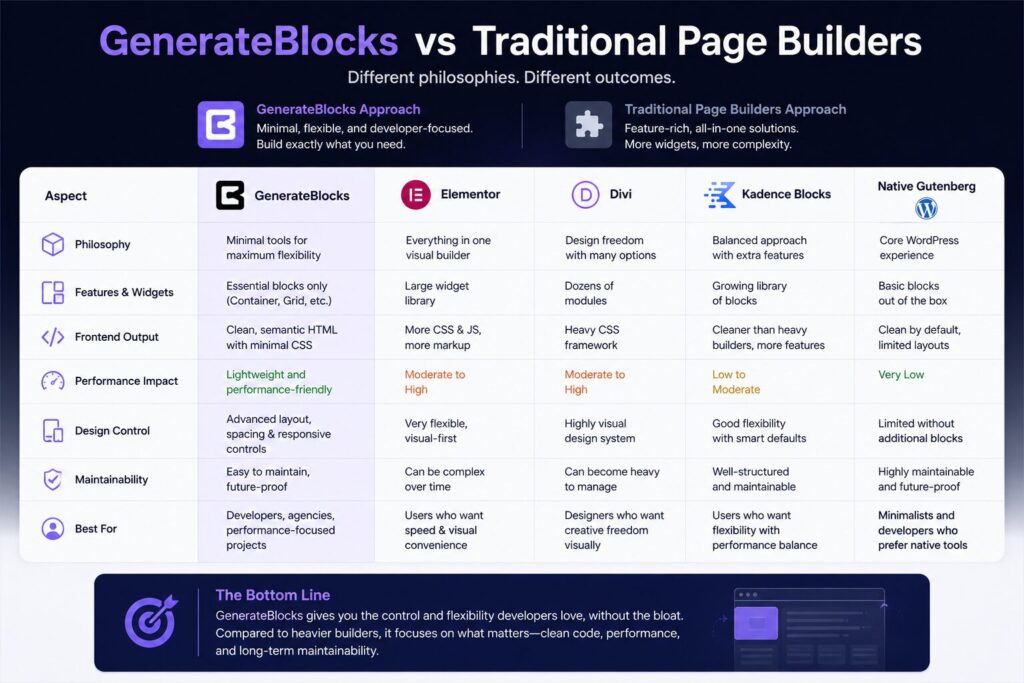
Traditional page builders typically focus on speed of creation through large widget libraries, prebuilt templates, and highly visual editing experiences. That approach can be helpful for beginners or rapid prototyping, but it may also introduce more frontend assets and structural complexity.
GenerateBlocks takes a more minimal approach. Instead of trying to provide every possible widget, it focuses on giving developers flexible foundational tools that can be combined into custom layouts.
Compared to native Gutenberg, GenerateBlocks fills many of the layout and responsiveness gaps that developers often encounter when building more advanced designs.
Compared to heavier builders, it generally appeals more to users who prioritize cleaner frontend structure, maintainability, and long-term performance.
Template Libraries Still Exist — But They Don’t Define the Workflow
Although GenerateBlocks is known for its minimal philosophy, it still includes templates and starter sections that can speed up development.
The important difference is that those templates feel more like starting points rather than locked systems.
Developers can import layouts and customize them freely without feeling restricted by rigid builder structures or excessive dependency on prebuilt widgets.
That balance between flexibility and efficiency is part of what makes the plugin appealing to more performance-focused users.
Performance Still Depends on the Full Stack
It’s important to keep expectations realistic.
GenerateBlocks alone will not automatically guarantee perfect Core Web Vitals or instant PageSpeed scores. Website performance still depends heavily on:
- – hosting quality,
- – image optimization,
- – font loading,
- – caching,
- – third-party scripts,
- – overall site architecture
However, starting with a lighter design system can remove a major source of frontend bloat early in the development process.
In many cases, avoiding unnecessary complexity from the beginning is far more effective than trying to optimize an already bloated site later.
Who This Workflow Works Best For
The GenerateBlocks + PressMeGPT combination works particularly well for:
- – developers who care about frontend performance,
- – agencies managing multiple client websites,
- – freelancers building custom Gutenberg sites,
- – users who want more control over layout structure without fully hand-coding everything.
At the same time, users looking for instant drag-and-drop experiences with large visual template ecosystems may find traditional builders easier initially.
GenerateBlocks offers more flexibility, but it also assumes a slightly stronger understanding of layout structure and responsive design principles.
Free vs Pro: Is GenerateBlocks Worth Upgrading?
The free version of GenerateBlocks is already capable enough for many websites, especially for users who mainly want cleaner layouts and better control inside Gutenberg.
The Pro version adds features like:
- – advanced styling options,
- – global styles,
- – template libraries,
- – reusable design systems,
- – workflow improvements for larger projects.
For freelancers and agencies building sites regularly, those additions can make the workflow noticeably faster and more organized.
Final Thoughts
GenerateBlocks has earned a strong reputation because it approaches WordPress design from a different angle. Instead of relying on massive feature lists and heavy visual systems, it focuses on flexibility, cleaner frontend output, and long-term maintainability.
When combined with PressMeGPT, the workflow becomes even more practical. PressMeGPT helps create a streamlined AI-generated WordPress foundation, while GenerateBlocks provides the layout precision needed to customize that foundation effectively inside Gutenberg.
For developers who want more design control without introducing unnecessary code bloat, the combination offers a strong balance between flexibility, performance, and maintainability.
Related Resources
– Complete Guide to Gutenberg Compatible Plugins & Addons
– Kadence Blocks + PressMeGPT: Performance-First Design
– Stackable + PressMeGPT: Award-Winning Design Library
– Generate Gutenberg WordPress Themes Instantly with AI
– GenerateBlocks Official Website
– GenerateBlocks Documentation
Sources & References
– WordPress.org Plugin Repository: https://wordpress.org/plugins/generateblocks/
– GenerateBlocks Official Website: https://generateblocks.com/
– GenerateBlocks Documentation: https://docs.generateblocks.com/
– Performance comparison data from independent testing
– Customer testimonials from WordPress.org and GenerateBlocks community